
IPPC LedgerPilot phase
Keep timber deliveries and ISPM 15 records together.
For wood-packaging businesses that buy treated timber. Connect deliveries with supplier evidence, see which documents are missing and export the records for a selected period.
Pilot phase: not generally available yet. Not an authority, no certificates, no legal assessment.
01The problem
The evidence exists. Just not in one place.
Delivery notes in binders
Which timber arrived when, from whom, how much? The answer is on paper or in a scan somewhere on a drive.
Authorisations in the inbox
The treatment provider's authorisation came as a PDF by e-mail. Is it still valid, and for which deliveries?
Treatment details in spreadsheets
Method, duration, batch: in a spreadsheet only one person understands.
And then the question
Which timber went into this job, and where is the evidence? Collecting it takes time, and gaps show up late.
02How it works
Five steps, from delivery to export.
- 01
Receive timber
Record the delivery: receipt date, supplier, sender as on the delivery note, wood type, quantity with its unit or mass in kg, treatment method and details.
- 02
Link the evidence
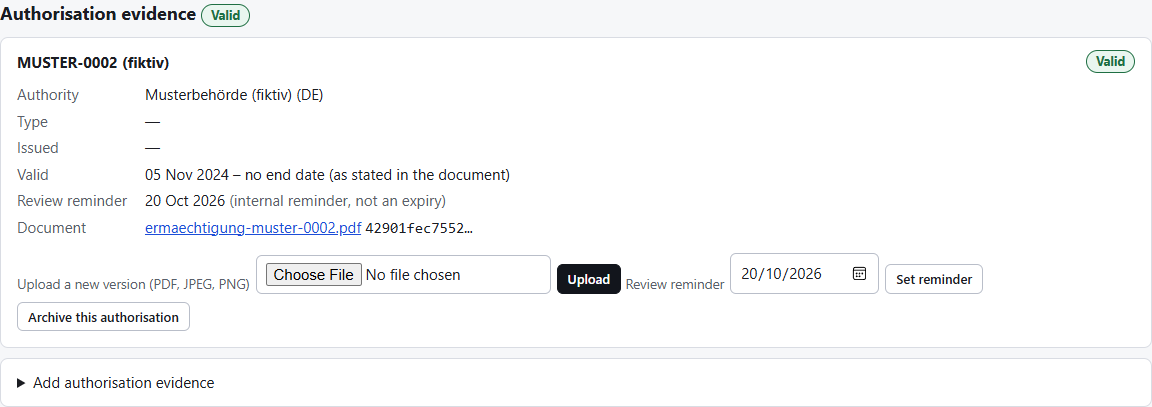
Attach delivery note, invoice and treatment evidence as PDF or photo; record the supplier's authorisation with number, authority and validity as stated in the document.
- 03
Link material to a job
Which material went into which packaging job, in the delivery's unit. Nothing is converted, and you cannot assign more than was delivered.
- 04
Review what is missing
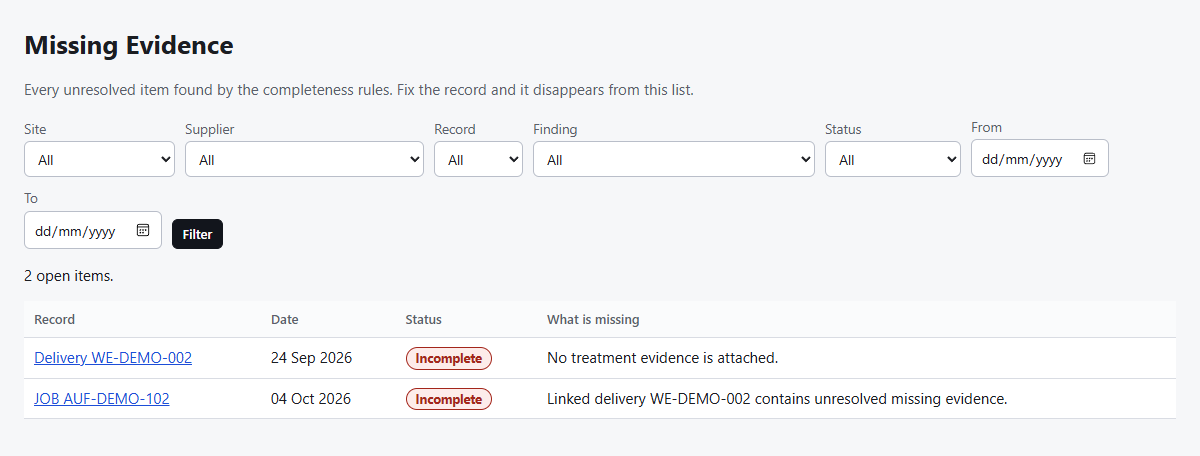
Each gap appears with its reason, such as “No treatment evidence is attached”. A person reviews documents; a rejected document no longer counts.
- 05
Export a selection
For a job, a supplier or a period: a ZIP with the original files, a PDF and CSV summary, where each file belongs, and the history.
03Example with fictional data
What it looks like in IPPC Ledger.
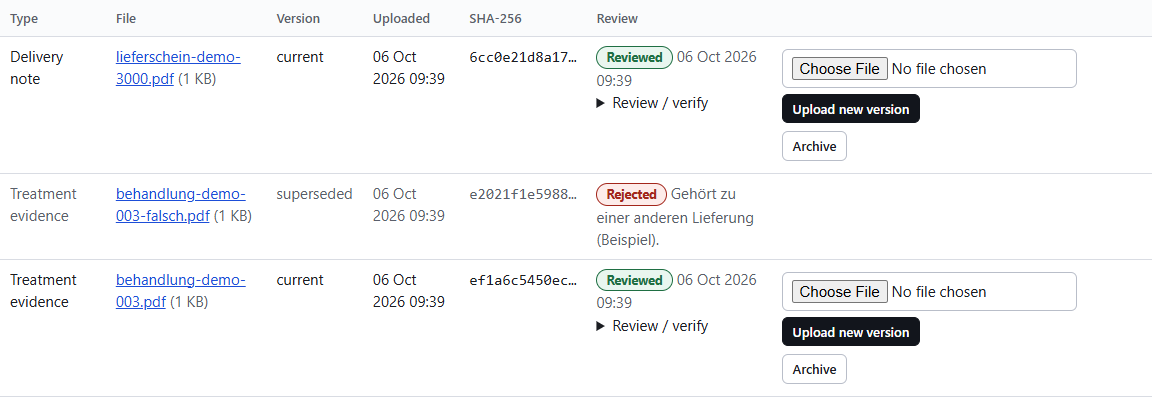
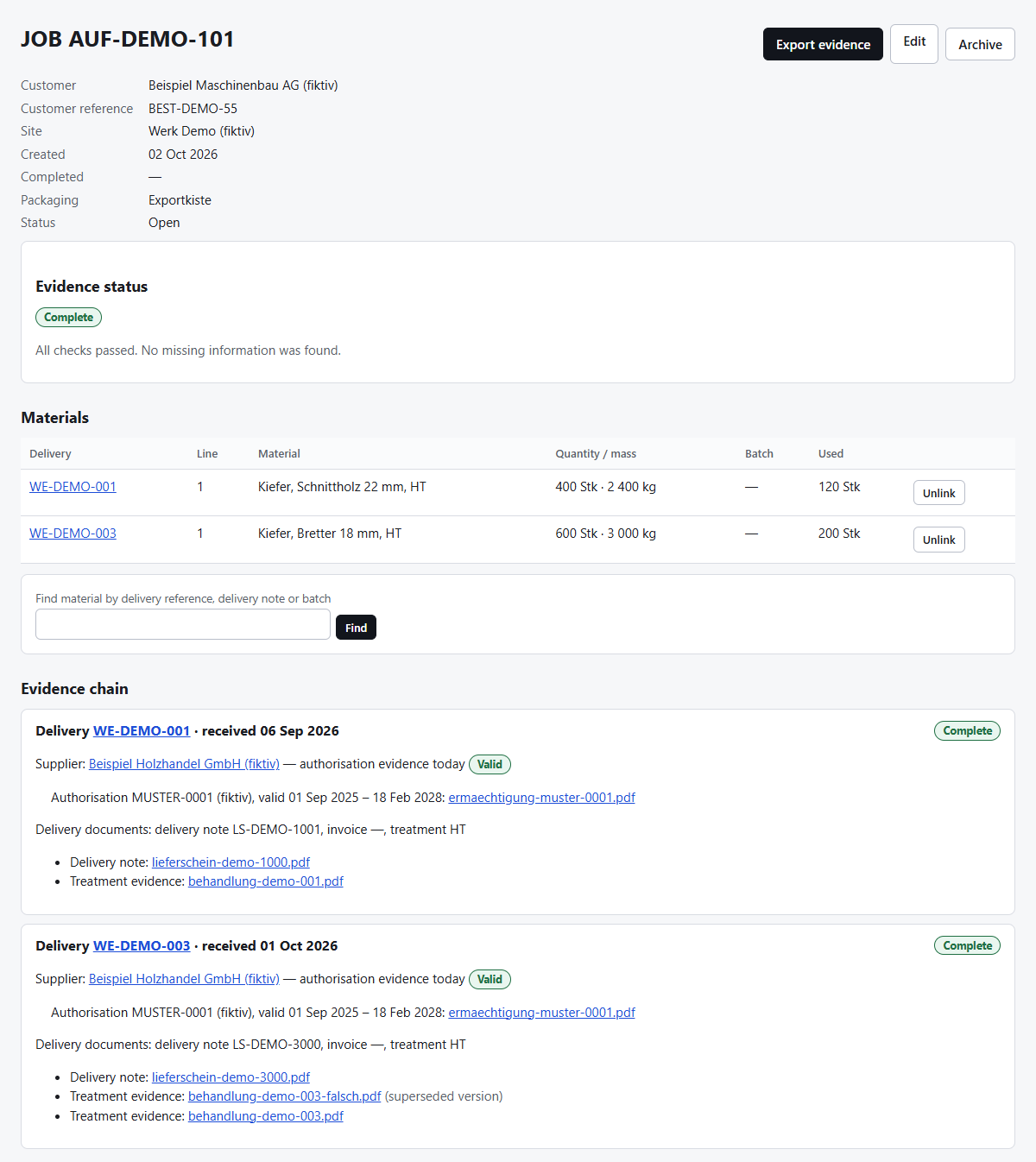
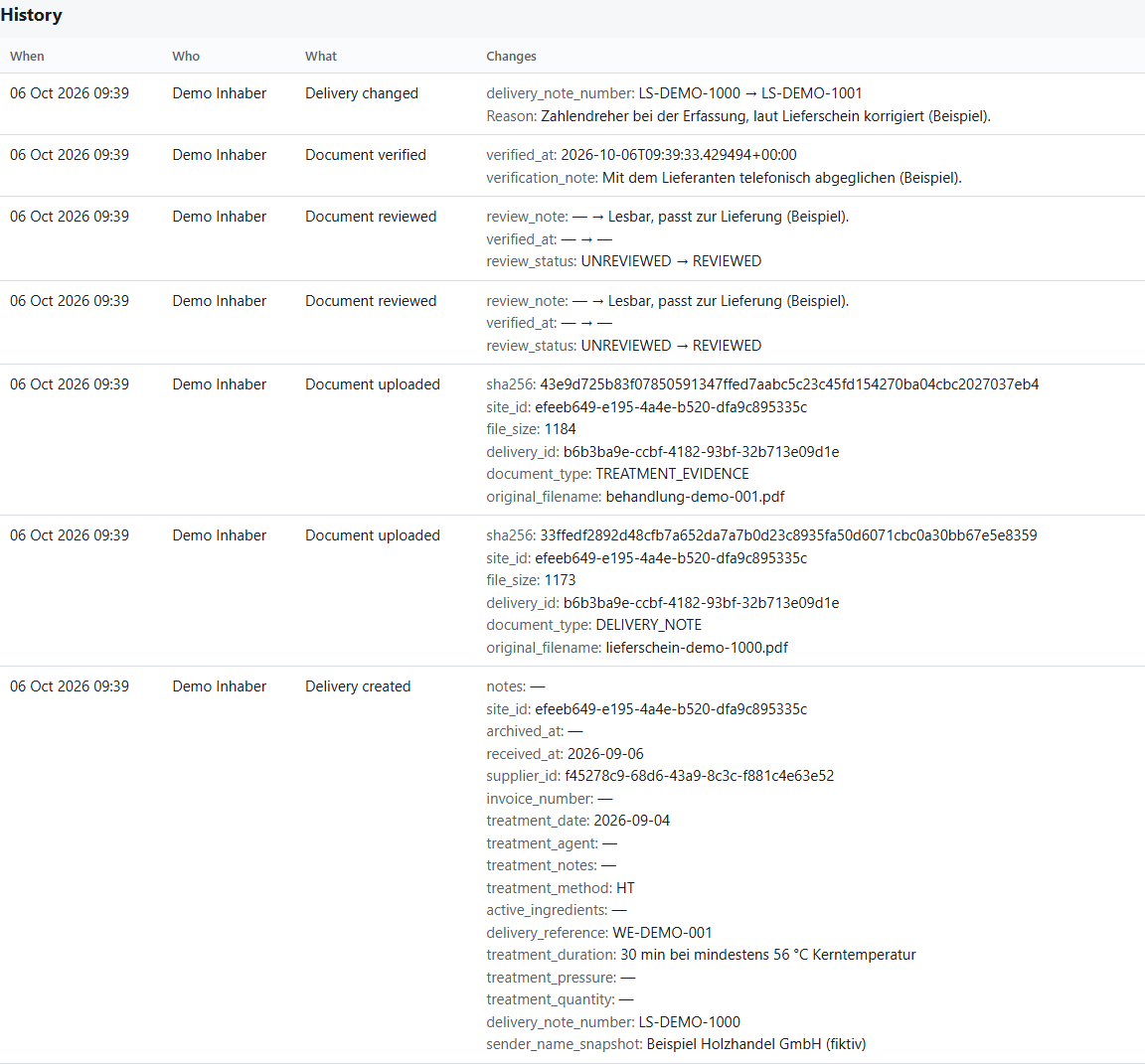
Real screens of the application with invented companies and sample documents. The application is available in German and English; these images show the English interface.

04The export
What is in an export.
An export for a period, a supplier or a job is a ZIP archive. The example holds the fictional deliveries of the last 60 days.
documents/The original files, unchanged and checked by checksum (SHA-256), including superseded versions.summary.pdfA printable overview: jobs and deliveries with their status and every open gap.manifest.csvFor each file: delivery, supplier, material, job, review status and checksum.deliveries.csv, material.csv, jobs.csv, suppliers.csvThe records as tables, safe against formula injection in spreadsheets.completeness.csvEvery missing or unestablished item with its rule and reason.audit.csvThe history of the included records, with the reason for each correction.
Incomplete items are not hidden: they appear with their reason in the summary and in completeness.csv. A period without deliveries gives a message, not an empty archive.
05What you can do
Grouped by task, not by technology.
Keep suppliers and authorisations
Authorisation with number, authority and document. An end date only if the document states one; the overview shows valid, expiring or expired.
Record incoming deliveries
One delivery with all its material lines in one step, documents included. A validation error never loses what you typed.
Review documents
Review, reject with a reason, record a check against the source. Uploading alone confirms nothing.
Trace jobs
Link material to a job with quantity and unit; the job shows its complete evidence chain.
Close the gaps
Incomplete, needs attention, not establishable: each with its exact reason, plus one list of everything open.
Correct with history
Recorded values change only with a reason. Documents are never overwritten; every version stays.
Bring your spreadsheets
Suppliers, deliveries and jobs from CSV or Excel, with a template, a preview of every row and your confirmation.
Work with roles
Owner, admin, worker, read only. Each business sees only its own data.
06Getting started
What to bring.
- Your suppliers' authorisations as PDF or photo, with number and authority.
- Delivery notes and treatment evidence for the deliveries you want to record.
- Your current jobs with job number, optionally customer and customer reference.
- Existing spreadsheets, if you have them suppliers, deliveries or jobs as CSV/Excel; templates are in the application.
You enter records in the application or import spreadsheets. PDFs are attached, not read automatically. A checklist on the start page leads through the first steps; the guide shows entering, attaching, correcting and exporting. Questions by e-mail to hello@logicalknight.com.
07Data and access
Your data stays your data.
Separated
Each business has its own area. The separation is also enforced in the database itself, not only in the application.
Behind a login
Access only with a personal account and role; accounts are created by the business's owner. No public sign-up.
Originals stay originals
Uploaded files are not changed; a checksum proves it in the export.
Traceable
Every change with person and time, every correction with its reason.
Exportable at any time
Owners and admins can export everything at any time, also when leaving.
Location and backups
Where the application runs during the pilot and how the database and files are backed up, we confirm in writing before you start. We do not state anything here that is not set up yet.
08Pilot
Test it with your own deliveries.
A pilot covers one site and your own deliveries and jobs. It is without obligation; terms after the pilot are discussed openly before anything applies.
- 01
Request
You send the form. We reply by e-mail.
- 02
Conversation
We clarify how you work today and what you want to record.
- 03
Access
You receive an invitation by e-mail and set your own password.
- 04
Record
Suppliers, deliveries and jobs, by hand or by import.
- 05
Review
Together: what did it bring, what is missing?
09FAQ
Frequently asked questions.
Who is IPPC Ledger for?
For businesses that make or repair ISPM 15 wooden packaging and buy treated timber for it. It organises evidence; it does not control a treatment kiln and is not an ERP or accounting system.
What must we enter?
Suppliers with their authorisations; for each delivery the receipt date, supplier, wood type, quantity with unit or mass, and the treatment details, plus the documents. For jobs the job number and the material used.
Can we bring existing spreadsheets and PDFs?
Yes. Suppliers, deliveries and jobs can be imported from CSV or Excel with a preview and your confirmation; duplicates are detected and nothing is overwritten. PDFs and photos are attached to records but not read automatically.
Does uploading a file verify it?
No. Uploaded only means present. A person marks whether it is the right, legible document; a check against the source is recorded separately. There is no automatic authenticity check.
What happens when evidence is missing or rejected?
The delivery, and every job that uses its material, is shown as incomplete with the exact reason. A rejected document no longer counts as evidence; it stays in the history until a new version is uploaded.
What does the export contain?
The original files, a PDF summary, the records as CSV, where each file belongs, every open gap and the history with correction reasons. The sample export above shows the contents.
Who can access our records?
The people your business's owner invites, each with their role. Other businesses see none of it. Logical Knight sets up access but does not read your documents.
Can we export our records when leaving?
Yes. The complete export holds every record, every document version and the full history. After you close the account, access stays for 30 days; then the data is deleted.
How do we request and start a pilot?
With the “Request a pilot” form. We reply by e-mail; then you receive an invitation to your own area.
Rather see for yourself?
Look at the sample export, or request a pilot. Questions to hello@logicalknight.com.
Request a pilot Download the sample export (ZIP, fictional data)